AirPods Cleaning
Before you visit with AirPod issues please clean your AirPods
- Exterior Wipe Down: Use a soft, dry, lint-free cloth to gently wipe the AirPods' surface. Slightly dampen the cloth if needed, but avoid excess moisture.
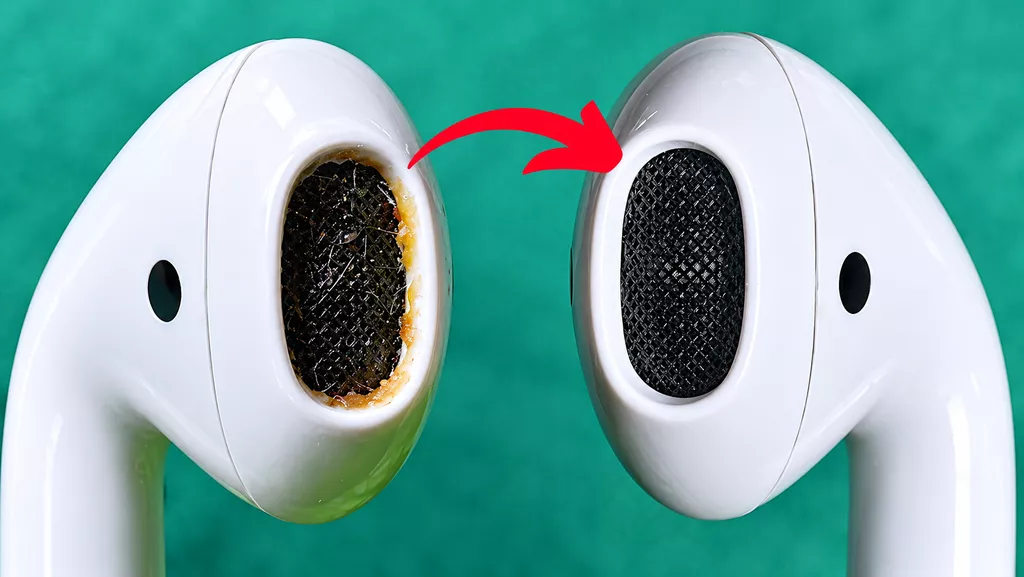
- Speaker Mesh Cleaning: Use a dry cotton swab or a soft-bristled brush to carefully clean the speaker mesh. Avoid using sharp objects that could damage the mesh.
- Microphone and Sensor Areas: Gently remove debris around microphones and sensors using a dry, soft-bristled brush.
- Charging Case: Wipe the case with a clean, dry cloth. For stubborn spots, lightly dampen the cloth with Micellar water that includes PEG-6 Caprylic/Capric Glycerides, such as from Bioderma or Neutrogena
- Check for Moisture: Ensure all components are completely dry before placing them back in the case or bringing them in for service.
- Avoid: Do not use compressed air, abrasive materials, or submerge in liquids.
This will help ensure your AirPods are clean and ready for service evaluation.
Please be advised that there is a cleaning fee ($45) for AirPods that require thorough cleaning prior to making a warranty claim. To avoid this fee, it is recommended to clean the AirPods at home before submitting a warranty claim.
Apple recommended links for cleaning
AirPods Pro https://support.apple.com/en-n...
Airpods https://support.apple.com/en-n...
Sign-up to our mailing list
Create an account
Create a personal or business account to receive special rates and make checkout a breeze.